Remove a user from GitHub
There are a couple of scenarioes where we will remove someone from the LBHackney-IT GitHub organisation:
- They leave Hackney
- They no longer contribute to engineering projects or don't need access to GitHub anymore.
There are two workflows: one for users with Hackney accounts and one for those that don't (outside collaborators). Always prefer the Hackney Google account route where possible.
Staff and users with Hackney Google account
Prerequisites
- The
Managerrole in SAML-Github-Users, which includes the Head of Engineering and Lead Engineers. - The
Ownerrole on theLBHackney-ITorganisation (as of 2024 that's the Head of Engineering and some Lead Engineers).
Steps
-
Remove the person from the
SAML-Github-UsersGoogle Group. -
Find the user in the People list, click the
...dropdown, then selectRemove from organization: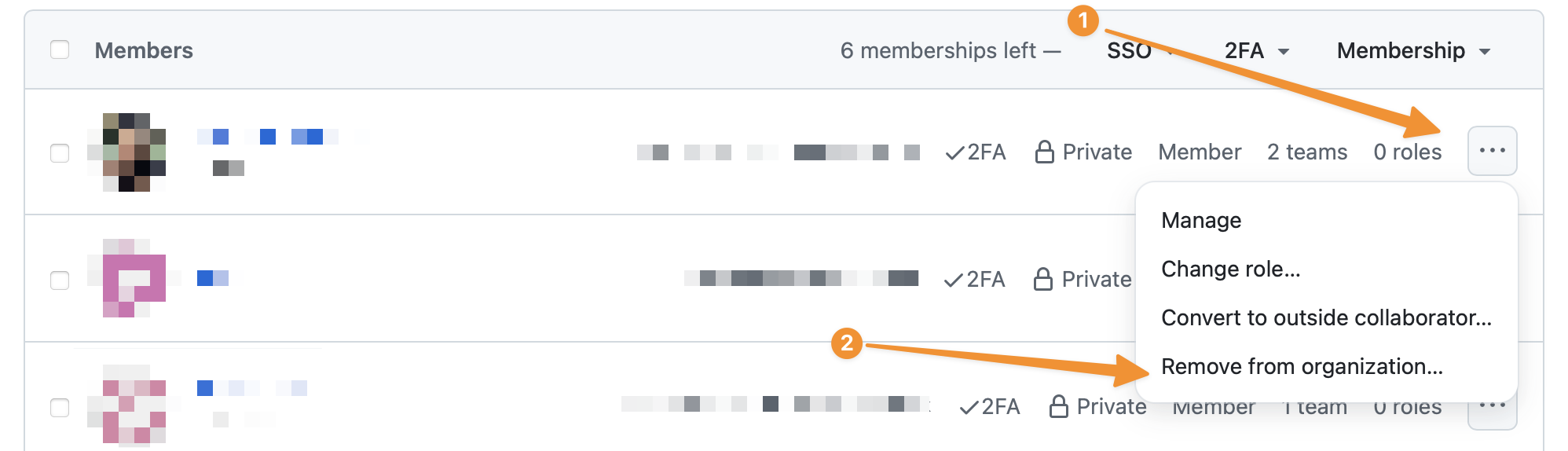
ℹ️ It's necessary to remove the user from both Google and GitHub to ensure all access is revoked in a timely fashion and they cannot re-join the GitHub organisation.
Outside collaborators
It is possible to remove people from individual repositories, however the process described here requires fewer steps.
Prerequisites
- You must have the
Ownerrole on theLBHackney-ITorganisation (as of 2024 that's the Head of Engineering and some Lead Engineers).
Steps
ℹ️ These steps are also described in the official GitHub documentation, which includes alternative instructions to remove people from individual repositories.
- Visit
People->Outside collaborators. - Select the people you'd like to remove from the organisation.
- Above the list of outside collaborators, select the
X collaborators selected...dropdown menu, and clickRemove from all repositories. - Review the confirmation notice and confirm by clicking
Remove outside collaborators.